
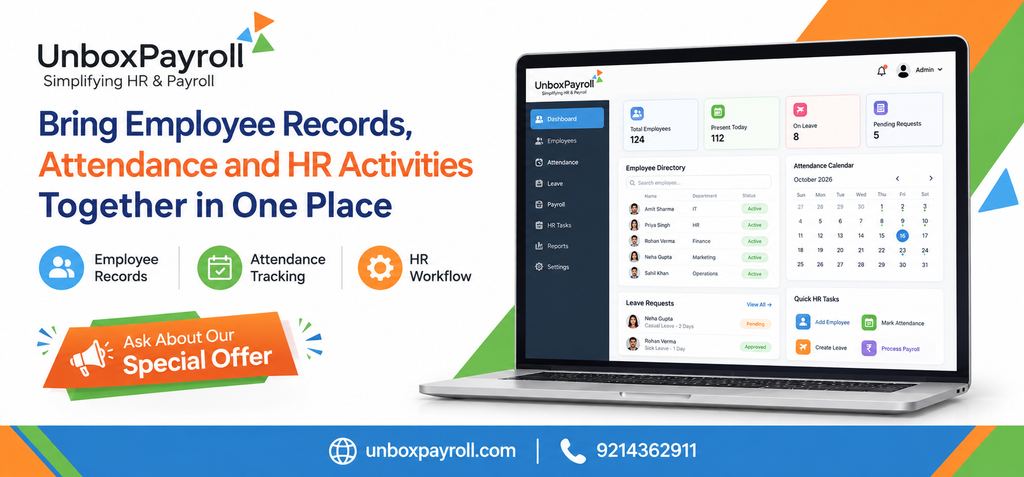
When employee information is spread across spreadsheets, attendance registers, emails, and separate HR applications, even routine administrative tasks can become difficult to manage. HR teams may spend time checking employee details, following up on leave approvals, correcting attendance records, and searching for documents that should be readily available.
These problems often become more noticeable as a business grows. New employees join, reporting structures change, leave requests increase, and managers need reliable information to make workforce decisions.
HRMS software in Jaipur helps businesses organize employee records, attendance, leave management, and other HR activities through a more structured system. Depending on the software’s capabilities, it can reduce duplicate data entry, improve access to information, and connect routine HR processes that would otherwise be managed separately.
For businesses in Jaipur, the goal is to create a reliable way to manage employee information throughout the employment lifecycle, from onboarding to exit, without making everyday HR administration unnecessarily complicated.
Why Businesses Need a Centralized HR Management System
Employee information is used across several business functions. HR needs it for onboarding and employee documentation, managers rely on it for attendance and leave decisions, and payroll teams use relevant records to process salaries.
When each team maintains a separate version of the same information, inconsistencies can develop.
For example, an employee’s department may be updated in one spreadsheet but remain unchanged in another. An approved leave request may not be reflected in the attendance record. HR may also need to contact multiple people to collect documents before completing a routine task.
A centralized HR management system provides a more organized approach by bringing relevant information and workflows into one platform.
Reduce dependence on scattered spreadsheets
Spreadsheets can be useful for simple administrative tasks, but they become harder to manage when multiple people update the same records or maintain separate copies.
A suitable HRMS can provide a structured employee database in which authorized users maintain relevant information. This makes it easier to locate records, review changes, and follow consistent procedures.
The objective is not to eliminate spreadsheets from every business activity. It is to reduce unnecessary duplication where a dedicated system can manage the information more reliably.
Improve coordination between HR and other departments
Employee information often needs to move between HR, finance, department managers, and payroll administrators.
A centralized system can make this coordination easier when the necessary functions and permissions are available. For instance, an approved employee record change can be managed through a defined workflow instead of being communicated through multiple emails.
Clear responsibilities remain essential. Businesses should establish who can add information, approve changes, and access confidential employee records.
What Can HRMS Software in Jaipur Help Businesses Manage?
An HRMS, or Human Resource Management System, is software designed to organize employee information and support HR processes. The exact capabilities vary by provider, so businesses should assess individual features rather than assume that every system offers the same functions.
1. Employee records and personal information
Employee records typically include information such as contact details, joining dates, job titles, departments, employment status, and relevant documentation.
A structured employee database allows authorized HR personnel to maintain these details in a consistent format. When information changes, the responsible team can update the relevant record rather than manually correcting several separate documents.
Businesses should also consider document organization, access permissions, record retention, and procedures for correcting inaccurate information.
These controls become increasingly important when an organization manages employees across different departments or locations.
2. Attendance and working hours
Attendance records help businesses understand employee presence, absences, and working patterns. Depending on company policy, these records may also be relevant to overtime calculations, leave balances, and payroll preparation.
When attendance is managed manually, HR may need to reconcile entries from registers, spreadsheets, or separate attendance devices.
HR software in Jaipur that supports attendance management can help organize these records and make discrepancies easier to identify. Before selecting a system, confirm whether it supports your attendance method, working schedules, approval rules, and required integrations.
3. Leave requests and approvals
Leave management involves more than recording the dates an employee is absent. Businesses may need to manage leave balances, different leave categories, approval hierarchies, and changes to previously approved requests.
A digital leave workflow can allow employees to submit requests and managers to review them through a defined process. HR can then maintain a more consistent record of approved and pending leave.
Where leave information also affects attendance or payroll, verify that the software connects these processes correctly and allows authorized users to review exceptions.
4. Employee self-service
Employees frequently contact HR for routine information, such as payslips, leave requests, and updates to personal details.
An employee self-service portal can give employees access to supported information and functions without requiring HR to handle every request individually.
Unbox Payroll’s published features describe an employee self-service portal for managing personal information, accessing payroll documents, and requesting leave. Its website also describes an Android mobile app for payroll information, leave requests, and employee communication.
Businesses considering these functions should check which actions employees can perform independently and which changes require HR approval.
5. Employee lifecycle management
Employee administration begins before the first working day and continues through employment changes and exit formalities.
A well-organized process can cover onboarding documentation, employee record updates, role changes, and offboarding tasks.
Employee lifecycle management helps HR maintain continuity as people move through different stages of employment. It also makes responsibilities easier to define, particularly when several teams participate in onboarding or exit procedures.
The available automation will depend on the selected software and how the organization configures its workflows.
How Integrated HR Software Improves Daily Operations
The real benefit of an HRMS is not simply having more features. It is the ability to coordinate related activities so that employees and HR teams do not repeatedly collect, enter, and verify the same information.
Consider a routine leave request.
In a disconnected process, an employee may email a manager, the manager may forward the approval to HR, and HR may update an attendance spreadsheet separately. If payroll needs the same information, another update may be required.
In a connected workflow, the request can be recorded, approved, and reflected in the relevant records through supported system functions. The responsible team can still review exceptions, but fewer steps may need to be handled manually.
This approach can improve daily operations in several ways:
- More consistent records: Relevant employee information is maintained through a defined process.
- Clearer approvals: Requests and changes can follow established approval responsibilities.
- Less duplicate entry: Connected functions may reduce the need to enter the same information repeatedly.
- Easier reporting: Authorized users can review attendance, employee records, and other supported information in a structured format.
- Better employee access: Self-service features can reduce routine requests to HR.
These benefits depend on correct configuration, reliable information, user adoption, and the actual functions available in the chosen platform.
Choosing the Best HRMS Software in Jaipur
The best HRMS software in Jaipur for one business may not be the right choice for another. A small company may mainly need employee records, attendance, and leave management, while a larger organization may require more detailed permissions, reporting, and approval workflows.
Use the following criteria to evaluate your options.
Match the software to your HR processes
Start by documenting how your business currently handles employee records, attendance, leave, onboarding, and routine approvals.
Identify where delays occur, where information is duplicated, and which activities require repeated follow-ups.
Use this list to assess whether a product solves your actual problems rather than choosing software based on a long feature list.
Check reporting and record accessibility
Managers and HR teams may need different views of employee information. Ask which reports are available, whether they can be filtered or exported, and whether the system supports your internal reporting requirements.
Also confirm how employees and managers access information and whether permissions can be assigned according to their responsibilities.
Review integration requirements
If your business already uses payroll software, attendance devices, accounting applications, or other HR tools, determine whether the proposed HRMS can connect with them.
Do not assume that an integration is available simply because a provider advertises multiple features. Confirm the specific integration, any additional costs, and the setup required.
Assess security and data handling
Employee records contain confidential information. Before adopting HR software, review user permissions, authentication options, backup practices, data handling policies, and the provider’s available security documentation.
Establish internal procedures for granting and revoking access, especially when employees change roles or leave the organization.
Consider implementation and support
Software adoption involves more than purchasing a subscription. Employee data may need to be cleaned, existing processes mapped, users trained, and approval workflows configured.
Ask about implementation assistance, support availability, data migration, and the time required to get the system ready for everyday use.
A solution that fits the business’s processes and can be adopted successfully is generally more useful than a feature-rich platform that employees struggle to use.
HRMS Requirements for Businesses in Jaipur
Businesses in Jaipur operate across different sectors and workforce sizes, so their HR requirements can vary. A growing company may need a more consistent employee database, while an organization with several departments may need clearer approval workflows and reporting.
For local businesses, the most useful approach is to select software based on the way employees are managed, not simply the location associated with the search.
For example, a business with employees working different shifts may prioritize attendance rules and exception handling. A company hiring frequently may focus on onboarding and employee documentation. An organization with a dedicated payroll team may place greater importance on the connection between attendance, leave, and salary processing.
Businesses operating in Rajasthan should also ensure that their HR processes reflect applicable employment requirements and internal policies. An HRMS can help maintain records and support workflows, but it should not be assumed to determine every legal obligation automatically.
When comparing HR software in Jaipur, assess these practical needs first and then compare providers against the same requirements.
How Unbox Payroll Supports Connected HR Operations
Unbox Payroll provides HR and payroll software with published capabilities covering employee data management, attendance tracking, leave management, employee self-service, and reporting. The company’s features page also describes employee lifecycle management and payroll-related records.
These functions are relevant to businesses seeking a more organized way to manage employee information and coordinate routine HR activities.
Before adopting the platform, businesses should confirm that the available features match their required workflows, user permissions, attendance arrangements, reporting needs, and payroll processes.
A practical evaluation starts with a few questions:
- Can our HR team maintain employee records in the format we need?
- Can employees submit leave requests and access supported documents?
- Does attendance management fit our working schedules and approval procedures?
- Can authorized managers obtain the reports they need?
- Will the system work with our existing payroll and attendance processes?
Answering these questions during a product demonstration helps establish whether the software is suitable for the organization.
Businesses can review the official Unbox Payroll features page for information about the published capabilities or visit the Unbox Payroll website to learn more.
Conclusion
Employee information, attendance, and HR activities are closely connected. When each is managed through a separate process, HR teams may spend unnecessary time checking records, following up on approvals, and correcting inconsistencies.
A suitable HRMS can bring these activities into a more structured workflow, helping businesses maintain consistent employee records, coordinate routine tasks, and improve access to information.
For organizations evaluating HRMS software in Jaipur, the first step is to identify the processes that create the most administrative difficulty and assess software against those specific needs.
Frequently Asked Questions
1. What is HRMS software, and how does it work?
HRMS software is a system for organizing employee information and managing HR activities through a structured digital platform. Depending on its capabilities, it may support employee records, attendance, leave approvals, onboarding, employee self-service, and reporting. Businesses configure the system according to their workflows and assign access based on employees’ responsibilities.
2. Which HRMS features are most important for small businesses?
Small businesses should usually start with reliable employee records, attendance tracking, leave management, document access, and straightforward reporting. If payroll is handled within the same system, they should also evaluate how relevant employee and attendance information is used during salary processing. The right combination depends on the company’s workforce and administrative requirements.
3. Can HRMS software connect attendance with payroll?
Some HRMS platforms connect attendance and leave information with payroll workflows. This can reduce repeated data entry and help teams identify discrepancies before salary processing. However, the available integration depends on the software, configuration, and attendance method. Businesses should verify the complete workflow before purchasing a solution.
4. Is cloud-based HRMS software suitable for businesses in Jaipur?
Cloud-based HRMS software may suit businesses that need authorized access to employee information across different teams or locations. Before selecting a platform, assess its access controls, availability, data handling, backup arrangements, and support. Also confirm whether its features and subscription terms fit the company’s operational requirements.
5. How should a business prepare for HRMS implementation?
Begin by reviewing employee records, identifying duplicate or outdated information, and documenting existing HR processes. Decide who will manage records, approve requests, and access reports. Then configure the software, test important workflows, and train employees and managers before moving routine HR activities into the new system.
6. How do I compare the best HRMS software in Jaipur?
Compare products against a consistent checklist covering employee data management, attendance, leave, reporting, integrations, security, implementation, support, and total cost. Request demonstrations using your actual HR scenarios and verify which features are included. This makes it easier to choose a system based on business needs rather than marketing claims.